


曾几何时alert陪伴了我很多歌日日夜夜,但现在人们越来越追求高端的技术,其实慢慢的我也都快淡忘了前端的世界里还有alert这么一个伟大的成员。
一、为什么抛弃了alert?
1. 不同浏览器的表现
其实最初使用alert还是一个常态,包括现在很多B端平台还在直接使用alert。人们不再使用alert,大概也是因为在不同浏览器下他的表现形式是不同的,给用户体验带来了不太好的影响。但由于美工缺失或者是使用便捷易上手,当时被人们奉为法宝啊。
|
1
2
|
// js片段alert('最初的弹窗'); |
不同浏览器的表现形式大概是这样:

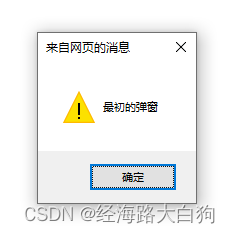
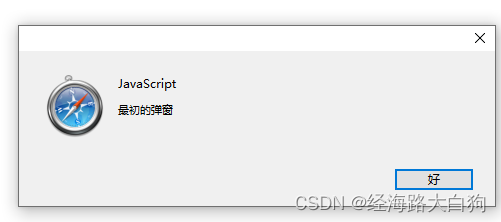
其实还有很多浏览器,对于这个原生的老古董alert方法的表现形式完全不一样,慢慢的人们发现用户体验是一个必须提升的事项,所以慢慢抛弃了alert方法。
2. 第三方组件的使用
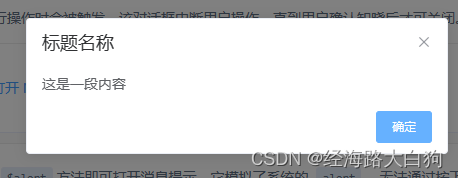
慢慢的,人们工作量加重,开始重视工作效率了,自己写代码工作效率低,于是开始使用各种各样的第三方组件,extjs easysui elementui ant 等等,既然人家提供了第三方的组件,使用快速且方便,最重要的是在每个浏览器的表现形式还是一致的,所以谁还会用alert呢。
3. 代码意识的控制
既然alert有了以上缺点,又出现了各种各样符合当代技术栈的UI组件库,人们也逐渐产生了一个共有的意识,代码里不写alert,不写confirm,上线不写console.log。甚至很多授课老师也产生了这个意识,很多开始学前端的最初不知道有这个alert全局方法,老师觉得教了没有意义,以后反正也不让用了跳过吧。于是就真的把alert这个方法变成老古董了。
二、用alert实现一个精美弹窗
为了表示对alert的怀念,我今天就想着用alert实现一个各浏览器表现都一致的弹框吧,希望还有很多人看了这篇博客能够记起这个曾经的伙伴。
1. 弹窗HTML元素的布局
首先需要实现一下你需要展示的弹窗,可以看到很多被大家所熟知的弹窗组件包含头部,身体,以及底部按钮部分,这些都是可以用一些简单的div p span等标签布局的,代码如下:
|
1
2
3
4
5
6
7
|
<div class="box"> <p class="title">标题</p> <div class="body">这里是一个弹窗</div> <div class="bottom"> <span onclick="hideAlert()">确定</span> </div></div> |
2. CSS部分的书写
这里基本就是模拟那些组件库做一个弹窗的样式,例如加一个圆角边框啦,设置一下标题区域的宽高居中啦,中间文案区域的样式等,底部还有一个确定按钮,这部分整体来说比较加单,代码如下:
|
1
2
3
4
5
6
7
8
9
10
11
12
13
14
15
16
17
18
19
20
21
22
23
24
25
26
27
28
29
30
31
32
33
34
35
36
37
38
39
40
41
42
|
* { margin: 0; padding: 0;}.box { display: none; margin: 100px; width: 396px; height: 180px; border:1px solid #EEE; border-radius: 10px;}.title { height: 40px; padding-left: 20px; font-size: 18px; font-weight: bold; line-height: 40px; background: #0052d9; border-radius: 10px 10px 0 0; color: #FFF;}.body { height: 100px; background: url(./bg.gif) repeat; text-align: center; color: #FFF; line-height: 100px;}.bottom { height: 40px; text-align: center;}.bottom span { margin-top: 5px; display: inline-block; width: 100px; height: 30px; border-radius: 10px; text-align: center; line-height: 30px;} |
3. 重点的alert方法覆盖实现
这里重点还是对alert方法的覆盖,意思就是我还是调用alert()方法,但却可以弹出让每个浏览器表现一致的弹框,这里需要对alert方法进行重写;
同时弹框的按钮要具有移除弹框的功能,意思就是点击确定按钮,我们需要把弹框隐藏掉,这些是需要使用js来实现的,代码如下:
|
1
2
3
4
5
6
7
8
9
|
let alertBox = document.querySelector('.box');function alert() { alertBox.style.display = 'block';}alert(); function hideAlert() { alertBox.style.display = 'none';} |

4. 完整源代码
|
1
2
3
4
5
6
7
8
9
10
11
12
13
14
15
16
17
18
19
20
21
22
23
24
25
26
27
28
29
30
31
32
33
34
35
36
37
38
39
40
41
42
43
44
45
46
47
48
49
50
51
52
53
54
55
56
57
58
59
60
61
62
63
64
65
66
67
68
69
70
|
<!DOCTYPE html><html lang="en"><head> <meta charset="UTF-8"> <title>alert弹窗</title> <style> * { margin: 0; padding: 0; } .box { display: none; margin: 100px; width: 396px; height: 180px; border:1px solid #EEE; border-radius: 10px; } .title { height: 40px; padding-left: 20px; font-size: 18px; font-weight: bold; line-height: 40px; background: #0052d9; border-radius: 10px 10px 0 0; color: #FFF; } .body { height: 100px; background: url(./bg.gif) repeat; text-align: center; color: #FFF; line-height: 100px; } .bottom { height: 40px; text-align: center; } .bottom span { margin-top: 5px; display: inline-block; width: 100px; height: 30px; border-radius: 10px; text-align: center; line-height: 30px; } </style></head><body> <div class="box"> <p class="title">标题</p> <div class="body">这里是一个弹窗</div> <div class="bottom"> <span onclick="hideAlert()">确定</span> </div> </div> <script> let alertBox = document.querySelector('.box'); function alert() { alertBox.style.display = 'block'; } alert(); function hideAlert() { alertBox.style.display = 'none'; } </script></body> |
5. 最后
alert几乎已经成为一个老古董了,会有越来越多的人忘记他,不再使用他。但如果关键时刻你需要用到了,请记得还有一个原生方法覆盖的知识点可以用哦。
原文链接:https://blog.csdn.net/xingyu_qie/article/details/128847202











暂无评论内容